if you feel bore and want to relax
Enjoy www.afcgame.com
Showing posts with label Financial. Show all posts

Monday, November 15, 2010

eazyWallet v2.00

eazyWallet v2.00 | Read more...
Price: Free

Description
eazyWallet is a free digital wallet and password safe application for Windows Mobile powered devices to store passwords, accounts and other sensitive data in an easy but secure way.

eazyWallet uses 3DES encryption which is state of the art encryption technology. It stores your passwords, your web registrations and associated information in a database (a file) protected by a single password.

eazyWallet allows you to store passwords and codes in a convenient location for when you are on the move.

Features:

- Quickly find your entries by using the filter box.
- Unlimited number of categories.
- Unlimited number of records in each categories.
- Sort entries by clicking on a column header.
- Access via secure login authentication.
- Full text search.
- All passwords are encrypted using 3DES encryption algorithm.
- Backup facility.
- A very original and easy-to-use user interface.
- Fast random password generator.
o Custom length.
o Modify password character set.
o Special character support.

Requirements:
Windows Mobile Pocket PC 6 , 6.1
.Net CF 2.0

Virtual Stock Trading Risk management 3.5 India USa Stocks v3.50

Virtual Stock Trading Risk management | Read more...
Price: Free

Description
You can play now virtual stock trade in your windows mobile touch phones for usa , india stocks with alarm when stock price reaches specified profit percentage and loss percentage with or without auto close positions. It displays total profit loss. Visit http://wmdeveloper.wordpress.com/virtual-risk-management-3-5-usa-india-stocks/

Requirements:
Windows Mobile Pocket PC 5 , 6 , 6.1, 6.5, 7.0
SqlCE 3.5
.Net Compact Framework 3.5

Thursday, August 5, 2010

Finesse-Calc v1.00

Finesse-Calc v1.00 | Read more...
Price: Free

Description
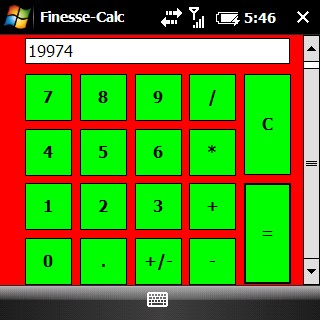
This is my first Windows Mobile App and I hope that it works on all devices. It is written in .NET CF and geared towards Windows Mobile 6.1 Devices! It has big finger friendly buttons great for touchscreens but should work without a normal screen. Installation Instructions: 1) Download the CAB file and transfer it onto your device via ActiveSync or any other synchronization tool. 2) Run the cab file with File Explorer or your choice of file explorer type. 3) Install onto device or Memory Card (it is a small program only 15 or so KB) If you like the software please comment! Thanks

Tuesday, March 23, 2010

Accountant 1.00

License: Free
Price: Free

Description
This program is a history book of your financial activities.
By this program you can keep the record of your income and expense on your pocket PC.
This program also supports Persian date.

Requirements:
Windows Mobile Pocket PC 5 , 6, .Net CompactFramework 2.0

Tuesday, March 9, 2010

Shp Finance 2.51

License: Free
Price: Free

Description
Shp Finance is a program for Windows Mobile to help you with your monthly budget. There are four tabs when you open the application. The first is the Income tab, where you enter in your income amounts, the frequency of your pay rate (hourly, weekly, bi-weekly, semi-monthly, or monthly), tax percentage, bonus amount, bonus taxes, and any overtime hours along with how much your overtime is worth (0.5x - 3.0x). When adding or editing an income item, you may also enter any pre-tax and post-tax deductions (health insurance, 401(k)) that are removed from your paycheck each pay period. The second tab is for Expenses, where you enter in all of your monthly expenses, how much they cost, and what day they're due (optional). Shp Finance automatically calculates how much (in percentage) of your monthly net pay is used by each expense. In the third tab, you can manually keep track of your ledger in your checking account by adding your credits and debits. Selecting Credit (+) will automatically give you a list of your income sources to auto-fill the amounts, and selecting Debit (-) will give you your expenses. The fourth and final tab is the Wallet tab. Here, you can store your personal information including credit card numbers, account numbers, logins for websites, SSN, and any other personal data you'd like to keep on hand. All the information is encrypted in the file, so people can not see your data. Password protection is recommended for files with this data. There are options to password protect your files, notify you of upcoming expenses when a profile is loaded, an option to open your last opened profile when the program loads, save your files in a backup location, and a few more. All information is saved in MBF files, so you can create multiple profiles if you wish, or have a different file for each month!

Requirements:
Windows Mobile Pocket PC 2003, 5 , 6 , 6.1, 6.5

Sunday, March 7, 2010

Your Bill v1.20

License: Free
Price: Free

Description
This is a free version of Your Bill Whiz. Your Bill Whiz makes it simple to manage your costs with both taxes and gratuities. It also allows you to split the bill with ease. Take charge with Your Bill Please support this project by purchasing Your Bill Whiz from this Marketplace http://marketplace.windowsphone.com/search.aspx?keywords=jcerna “Bill Splitting Done Right” http://www.fuzemobility.com/your-bill-whiz-bill-splitting-done-right/ Not just a tip calculator but a very powerful, flexible, and easy to use app.


Do you know the Tax percentage you’re paying for?
How about Gratuities?
Your Bill Whiz makes it simple to manage your costs with both taxes and gratuities. It also allows you to split the bill with ease.
Take charge with Your Bill

Requirements:
Windows Mobile Pocket PC 6 , 6.1, 6.5
.Net 3.5

Thursday, February 18, 2010

Your Bill 1.10

License: Free
Price: Free

Description
This is a free version of Your Bill Whiz.
Do you know the Tax percentage you’re paying for?
How about Gratuities?
Your Bill Whiz makes it simple to manage your costs with both taxes and gratuities. It also allows you to split the bill with ease.
Take charge with Your Bill

Requirements:
Windows Mobile Pocket PC 6 , 6.1, 6.5 .Net 3.5

Wednesday, January 20, 2010

Shopping List Mobile v1.00

License: Free
Price: Free

Description
Shopping List Mobile was developed to be a useful tool to help me remember what I need to buy when I go shopping. Hopefully it will be helpful to you to.

Requirements:
Windows Mobile Pocket PC 5 , 6 , 6.1, 6.x .Net CF 3.5

Wednesday, January 13, 2010

PPC Expense 1.60

License: Free
Price: Free

Description
PPC Expense is a simple and easy to use personal financial management software that focuses on managing your daily expenses. It records your daily spendings rapidly and efficiently the moment you make them. You can define custom categories and subcategories, create reports, view statistics and also backup and restore the data source.

Features
  • Simple and Intuitive User Interface
  • User Defined Categories and Subcategories
  • Easy to Add, Change and Delete Expenses
  • Report and Statistics
  • Backup and Restore
Requirements:
Windows Mobile 2003 Pocket PC, Windows Mobile 5.0 Pocket PC, Windows Mobile 6 Classic, Windows Mobile 6 Professional or later version installed. It supports QVGA an VGA screens with either portrait or landscape orientation.

Sunday, January 3, 2010

Finansist.PDA 1.2

License: Free
Price: Free

Description
Finansist.PDA help you to manage your finances and offers many functions (some of them currently are in development stage) such as synchronizing with multiple computers, obtaining current exchange rate from the Internet, show reports, etc.

Note: The program requires MS Compact Framework 3.5. Finansist.PDA can work without Internet access.

More information about the program Finansist.PDA you can find at http://finansist.chanaev.ru/
Translations, comments, bugs and suggestions, please send to sergey@chanaev.ru.

Important! To update aplication without lose my data you need copy file MainDB.fdb from path_where_you_install_application\Database\ to any safe place (for example to \My Documents). After that install new version and copy this file back, overwriting existing new file.

Requirements:
Windows Mobile Pocket PC 5 , 6 , 6.1 .NET Compact Framework 3.5

Friday, January 1, 2010

MortgageCALC 1.60

License: Free
Price: Free

Description
MortgageCALC is a free loan calculator for Windows Mobile devices (Professional and Standard).

Using MortgageCALC on your Windows Mobile device you can quickly establish the affordability of major asset purchases.

MortgageCALC has the usual 'standard' loan calculator functions, plus:

* Interest compounding period options of Daily, Weekly, Monthly, Quarterly, Half Yearly and Annual,
* Repayment frequency option of Weekly, Fortnightly, Monthly, Semi-Monthly, Quarterly, Half Yearly and Annual,
* Interest Only calculations,
* Amortisation calculations,
* Graphing of amortisation calculations, and
* Variations to a loan can be made (Rate/Term/Pmt etc) and the calculations compared.

Requirements:
Windows Mobile Pocket PC or Smartphone 5 , 6 , 6.1, 6.5 (Professional or Standard) .NET Compact Framework 2.0 or above

Wednesday, December 23, 2009

HTC Sense 2.5 Animated Background Wallpaper


License: Free
Price: Free

Description
You can see many sites using snowfall animation on their site during the Christmas season ever wanted to do that to your phone ? If your answer is yes then read on to find out how it is done. Kudos to Pocketnow for the find. According to them it should work on WVGA ROMs with HTC Sense 2.5. Plz note that this will replace one of the stock animated wallpapers (the one with circles) and uninstalling will NOT bring that old wallpaper back.

Saturday, November 7, 2009

Shp Finance v2.50

License: Free
Price: Free

Description
Shp Finance is a program for Windows Mobile to help you with your monthly budget. There are four tabs when you open the application. The first is the Income tab, where you enter in your income amounts, the frequency of your pay rate (hourly, weekly, bi-weekly, semi-monthly, or monthly), tax percentage, bonus amount, bonus taxes, and any overtime hours along with how much your overtime is worth (0.5x - 3.0x). When adding or editing an income item, you may also enter any pre-tax and post-tax deductions (health insurance, 401(k)) that are removed from your paycheck each pay period. The second tab is for Expenses, where you enter in all of your monthly expenses, how much they cost, and what day they're due (optional). Shp Finance automatically calculates how much (in percentage) of your monthly net pay is used by each expense. In the third tab, you can manually keep track of your ledger in your checking account by adding your credits and debits. Selecting Credit (+) will automatically give you a list of your income sources to auto-fill the amounts, and selecting Debit (-) will give you your expenses. The fourth and final tab is the Wallet tab. Here, you can store your personal information including credit card numbers, account numbers, logins for websites, SSN, and any other personal data you'd like to keep on hand. All the information is encrypted in the file, so people can not see your data. Password protection is recommended for files with this data. There are options to password protect your files, notify you of upcoming expenses when a profile is loaded, an option to open your last opened profile when the program loads, save your files in a backup location, and a few more. All information is saved in MBF files, so you can create multiple profiles if you wish, or have a different file for each month!

Requirements:
Windows Mobile Pocket PC 2003, 5 , 6 , 6.1, 6.5

Wednesday, October 28, 2009

Shp LoanCalc 0.30

License: Free
Price: Free

Description
It's a loan calculator... Just type in the loan amount, term in months, and the interest rate, and your monthly payment will be calculated. Click Amortization to see the full amortization of the loan over the full term. If you'd like to add a little bit of extra bread to those monthly payments, input it into the Curtailment box and see how fast you can pay that sucker off.

Requirements
:
Windows Mobile Pocket PC 5 , 6 , 6.1, all screen resolutions

SpbWallet 2.0.0

License: Free
Price: Free

Description
SPB Wallet is a secure and manageable storage of sensitive information, such as passport and account numbers, access and PIN codes, logins and passwords. The encrypted and password-protected data can be accessed from Windows PCs, and synchronized with mobile devices and now on Symbian S60 also.

Features
* Cards look like those in your wallet
* 60+ predefined templates, icons and graphics
* Online Template gallery with 10,000+ cards
* Fully customizable
* Alternative views

Tuesday, September 15, 2009

Spb Finance 2.8

License: Free
Price: Free

Description
Spb Finance is a financial manager that you can carry in your pocket. You don't have to write down all your day's expenses and transfer them to your desktop PC financial manager later. Enter your expenses into Spb Finance on the spot and forget about them, Spb Finance will remember them for you. Entering a transaction is a two-click business, since Spb Finance has a built-in autocompletion feature.

Do you use Microsoft Money or Quicken at your desktop? Spb Finance has special features for synchronization with these products.

Features

- Powerful Register View
- Advanced reports
- Advanced Today Plug-In
- Budgets
- Customizable Reports
- Instant transaction adding with Spb Finance Entry
- Transactions Scheduling
- Multicurrency Support
- Data Encryption
- Data Backup, Scheduled Backup
- Import/Export (QIF, OFX, CSV, XML, Desktop Excel)
- Synchronization with Microsoft Money (2002 — 2008)
- Synchronization with Intuit Quicken (2003 — 2006)

Tuesday, September 1, 2009

Finansist PDA v1.1

License: Free
Price: Free

Description

Finansist.PDA help you to manage your finances and offers many functions (some of them currently are in development stage) such as synchronizing with multiple computers, obtaining current exchange rate from the Internet, show reports, etc.

Note: The program requires MS Compact Framework 3.5. Finansist.PDA can work without Internet access.

More information about the program Finansist.PDA you can find at http://finansist.chanaev.ru/
Translations, comments, bugs and suggestions, please send to sergey@chanaev.ru.

Important! To update aplication without lose my data you need copy file MainDB.fdb from path_where_you_install_application\Database\ to any safe place (for example to \My Documents). After that install new version and copy this file back, overwriting existing new file.

Requirements:
Windows Mobile Pocket PC 5 , 6 , 6.1 .NET Compact Framework 3.5

Tuesday, August 18, 2009

Travel Expenses v1.2.6

License: Free
Price: Free

Description
By taking advantage of the touch screen and ease of navigation, Travel Expenses makes it easy to store expenses incurred while out of town.

Think about it. How many times have you been out of town on business and on your return, you realize there are some costs you forgot to write down or you did but you can't find the paper you wrote it on? These small amounts add up in the end.

Very rarely does one leave home without their hand held device. It seems to be one of the most important devices we have.

Travel Expenses does not replace the actual company report, but it does keep all the information handy, as close to you as your handheld device.

Requirements:
Windows Mobile Pocket PC 5 , 6 , 6.1

Finansist PDA v1.0

License: Free
Price: Free

Description
Finansist.PDA help you to manage your finances and offers many functions (some of them currently are in development stage) such as synchronizing with multiple computers, obtaining current exchange rate from the Internet, show reports, etc.
Note: The program requires MS Compact Framework 3.5. Finansist.PDA can work without Internet access.

Requirements
:
Windows Mobile Pocket PC 5 , 6 , 6.1 .NET Compact Framework 3.5

Tuesday, July 14, 2009

PocketCharts 1.06

PocketCharts | 1.06 | Download
Description
This lets you download stock and index price data from the Internet and view it in interactive charts on your PDA.

Requirements:
PocketPC