if you feel bore and want to relax
Enjoy www.afcgame.com

Friday, December 18, 2009

Wizcode PhotoCopy 1.01

License: Free
Price: Free

Description
Turn your mobile device into a fully featured photo copy machine, scanner and fax machine. Use the built-in camera to photograph (scan) paper documents on the go or take pictures and have them converted to compact PDF files with a single click of the stylus. In addition, you can also load images from your storage card and combine them with a scanned document, or combine multiple documents/images into a single PDF file. Share scanned documents with your contacts instantly by emailing them from within the application. PDF files can be saved to your mobile device for digital archiving or backup.

Use Wizcode PhotoCopy Mobile to:
* Archive and share documents on the go
* Photocopy text, magazine pages or other printed materials
* Scan business cards, recipes, meeting memos or notes
* Create PDF photo albums

Here are some key features of "PhotoCopy Mobile":
· Scan materials using the built-in camera
· Import images from storage card or device
· Change the order of the pages
· Insert blank pages
· View, zoom, rotate or crop images
· Delete images
· Create high quality PDF files from images
· Save PDF files to your device
· View PDF files with your default PDF application
· Send PDF files by email and share them with other people

Requirements : Windows Mobile 5/6.x

Total Commander 2.52 beta 2

License: Free
Price: Free

Description
One of the most popular file managers.

Features:
Copy, Move whole subdirs
Inplace rename, create dirs
Delete (no recycle bin)
Zip and unzip
Properties dialog, change attributes
Built-in text editor
Search function (also for text)
Select/unselect groups of files
Select with [Sel] button
FTP client
Registry editor
LAN access
Send/Receive via Infrared (OBEX)
Brief, full and large icons mode
Single or two file window mode
Option to hide all files in ROM
Directory hotlist as in Total Commander
Directory history through dropdown list
Tree view
Configurable button bar
Simple help function
Supported languages: English, German, Catalan, Czech, Danish, Dutch, French, Hungarian, Italian, Polish, Russian, Simplified Chinese, Spanish and Swedish

Requirements : PocketPC 2003(SE), WM5, WM6.5 - The supported processors are: ARM, XSCALE, MIPS, SH3, X86

Sprite Backup 6.5.5.1

License: Free
Price: Free

Description

Device backup software is very much like vehicle insurance: you know you have to have it so you shop around for the best you can find, but in truth you really hope you'll never actually need it. That's when the paranoia sets in. If I back up to my memory card, what if I lose it? If I back up to my PC what if the hard drive gets bad sectors? Do I need to backup my backup? Sprite Backup from Sprite Software aims to make your backups as hassle free and worry free as possible on your Windows Mobile device. So is it the perfect solution to give you peace of mind? Read on to find out!

Features
- Supports ALL WM5 & WM6 Devices
- Backup to FTP Server
- Backup to PC
- Sprite PC Manager
- Sprite Explorer
- Upgrade Mode Recovery
- Support for WM 6 Storage Card encryption
- Full & Custom Backup and Restore operations
- Self-Extracting Backup Files
- Automatic Scheduled Backup
- Automatic Backup File Management

iPhoneToday 1.3

License: Free
Price: Free

Description
iPhoneToday emulates the iPhone interface on Windows Mobile.

Install:
1. Install *.cab (In Internal Memory)
2. Copy iPhoneToday folder to root of internal memory
3. Go to Settings/Today/Elements and active the iPhoneToday element

Features:
· Multiples screens (With animates transactions)
· Notification on icons for calls, sms, etc
· Is a Today (No problems when we push the home button, no problems with incoming calls, ...)
· Compatibility with others todays (By example: Date Today and iPhoneToday after), today height configurable
· QVGA, VGA, WVGA... (The user define the icon size and height screen)
· UI for Icons managing
· UI for configuration
· Very low memory
· FAST!

Iconsoft PhonEx 2.2

License: Free
Price: Free

Description
The Iconsoft Phone Extension (PhonEx) is a new generation program implementing a new type of user interface for managing the main functions of a phone, built on the basis of the Iconsoft Mobile Engine. PhonEx opens up new possibilities for easy interaction using simple touch, without the stylus, while retaining all the capabilities of a Windows Mobile device.

Note: Themes for PhonEx can be found here.

Features
· Convenient and intuitive interface
· Interaction using simple touch (without stylus)
· Today plug-in
· Address book
· Photo contacts (including SIM contacts)
· Individual tune for calls (including SIM contacts)
· Expanded call history for each contact
· Image library
· Favorites group
· Full-screen incoming call
· Full-screen Dialer
· New and easy Phonepad
· Convenient contact search
· Personalization
· Broad options capability
· and much more!

Requirements : Windows Mobile 5/6.x

Cliquick 3.08g

License: Free
Price: Free

Description
Fast, Simple, Finger-Friendly Soft Onscreen Keyboard.

Fastest Touch Keypad
- 70% of text requires only a single tap to enter
- Twice faster any traditional phone keypad
- Faster than any Semi-Qwerty keyboards

Full Keyboard with Huge Keys
- 50% bigger keys than in other keyboards
- 3 or 4 lines customizable skins
- Additional valuable screen space

Customizable
- Various skin layout & sizes
- Supports over 120 languages
- Russian, Hebrew, French, Spanish, Korean, German…

Convenient
- Optionally works with the "Word Completion"
- Improved feedback – Visual, Sound & Vibration
- Fast symbols entry without switching modes
- One-handed or two-handed operation
- Additional valuable screen space

Requirements : WM5-6.1

ICQ Mobile 1.0.23

License: Free
Price: Free

Description
ICQ for Windows Mobile brings all of the best features of ICQ on your PC to your Windows Mobile device! ICQ for Windows Mobile lets you communicate whenever you want, wherever you are, in whatever way suits you best. Update your ICQ status and information when you're on the go. Change your conversation style, manage your Contact List, and much more. ICQ for Windows Mobile has many of the same key features and the familiar look-and-feel of the desktop ICQ client.

What's new in ICQ for Windows Mobile 1.0.23.1:
· Ability to add ICQ and AIM Contacts
· Added Search for Contact
· Updates to theme and color
· Updated Settings pages
· German, Czech, and Russian versions available of your favorite mobile ICQ application
· Fixed profile display of 'unknown' when no info available for a contact
· Several other bug fixes

Requirements : Windows Mobile 5/6.x

Thursday, December 17, 2009

SKTools 4.4.7.15

License: Free
Price: Free

Description
Powerful maintenance toolkit. Clean the registry and the file system, Free UP RAM, other methods of system maintenance and much more...

Feature

Cleaning:
· Find and delete temporary and absolete files
· Clear temporary and cache folders like IE contents, IE history, Mail attachments, Large mails, AvantGO and custom users folders
· Find and remove bad registry keys and values
· Find and delete bad shortcuts
· Find and delete duplicate shortcuts
· Find and delete duplicate notify queue entry/entries
· Find and delete bad uninstall info
· Find and delete files depending on whose size or/and names (wipe optional)
· Find and delete duplicate files (find with name,size,crc)
· Find and delete MS Reader bookmarks (sensitive for bookmark in-use/not-use)
· Find and delete empty folders
· Find and delete exceed appointments
· Find and delete duplicate tasks
· Find and delete duplicate appointments
· Delete PIE history (registry)

System Information:
· Device information and features
· Processor information
· Memory information
· Screen information
· OS version
· Network
· Power state
· ROM information

Duplicate Contacts:
· Find duplicate contacts (by all fields or names,email,company,phones)
· Show
· Delete

Notify Queue:
· View records
· Add records
· Delete records
· Find doublicates

Memory Usage:
· Show all folders with size (bytes and percent)
· Open selected folder

Backup/restore:
· Auto (may disabled) backup registry key before delete it
· Full system backup (for PPC 2002, WM 2003 (SE))
· Sheduled weekly full backup
· Full registry backup
· Full filesystem backup
· All databases backup
· ActiveSync Partnership backup
· MSReader activation backup
· Self backup
· Password protection for backup files
· Find and restore all SKTools backup files
· Good compression for backup files

Storage card maintenance:
· Show information about card(s)
· Format
· Scan and Fix
· Empty
· Rename
· Other...

Database maintenance:
· Show information
· Delete
· Empty
· Export/Import to XML file (as example for partially backup or for transfer contacts database to other PPC)

Process list:
· Show all process
· Show list of modules of any process
· Show information about memory usage, threads
· Show command line for procees (if it exist)
· Close one or selected processes

Today plugins list:
· Show information about plugins
· Delete and Uninstall (if possible)
· Enable/disable plugin
· Reorganise today plugin order with renumbering

Input methods list:
· Show information about installed
· Delete and Uninstall (if possible)
· Enable/disable
· Select default method

Windows Startup:
· Display list of programs that run when system loading
· Delete program
· Add new
· Startup programs order control

Built-in Uninstaller:
· Show list of installed program with size and date
· Show list of files and registry keys for installed programs
· Uninstall program
· Save installed programs list to text file

Automation mode:
· Run SKtools when system loading
· Run SKTools every day at user defined time (with power off after work)
· User defined operations list
· Silent (run with out any window, only with led blink) mode

Other:
· Multi-language support ( English, German, Spanish, French, Russian, Italian )
· Change location of PIE cache, PIE history, PIE coockies, AvantGO datas
· System optimisation option
· Soft and Hard reset
· Command line support (screen off/on,power off, soft/hard reset and more...)
· Change system path (after this you can move some dlls from windows folder to any location, as example to storage cards)
· Free customizable today plugin (you can run SKTools and your favourite programs quickly)
· More...

Requirements:
· Windows Mobile 5/6

SKScheMa 1.2.17

License: Free
Price: Free

Description
SKSchema is a multi-functional scheduler allowing to automatically perform different actions at the time specified as well as to perform actions depending on other programs being launched/closed. The program can be used as an advanced alarm clock and also as a reminder.

For example, the program makes it possible to set the following tasks:
?to launch a backup program at 0.40 every Tuesday during January and February 2006?
?to awake the owner daily during a week with different sound files?
?to establish a GPRS connection if a mail client or PocketIE is launched??

SKSchema features:
runs programs, plays sound files at the specific time, with the specified periodicity
shows a reminder at the time specified along with a signal (a sound file, vibro). A reminder can be postponed.
sends sms at the time specified
makes a phone call at the time specified (it is very useful when somebody should be woken up automatically)
switched PDA on and off and makes a soft reset at the time specified
closes the indicated programs at the time specified
change today theme at the time specified
clones an event (for example, to beep every 25 min within 5 hrs)
switches a phone on and off (PIN-code input is possible), BT and Wi-Fi on/off (device dependent)
emulates a screen tap or a keyboard input
supports scripts which are to be executed at the time specified as well as directly from Explorer or with a shortcut in Start Menu
watches launched and closed programs (by window name) and performs different actions for these events
watch for phone events like call(ring), answer, connect, disconnect, phone on/off, incoming sms. SKScheMa can run command/script/program for all this events.
has an adjustable Today plug-in showing the most immediate tasks and also used for a quick-launch of SKSchema
it is possible to create frequently used sets of events
many other features
QVGA, VGA support
WM2003(SE),WM5 support

SKMenu 1.7.10

License: Free
Price: Free

Description
Completely adjusted menu, launcher, task manager.
Make your menu!

* Freely positionable SKMenu symbol on Today screen/Task /Tray bar
* Freely positionable SKMenu symbol as indicator with status display
* Indicator modes: digital, graphic
* Menu "New" emulation
* Standard menu mode
* Full screen menu mode
* "Standard Taskbar" mode
* Freely selectable SKMenu symbol size
* Freely selectable fonts (name, size, type)
* Freely selectable color for menu text
* Freely selectable color for menu highlighted text
* Screenshot option (QVGA,VGA)
* Freely selectable sound (.wav) for Screenshot option
* Clear Type On/Off
* Freely definable colors for SKMenu window like symbol background, fonts, separators, window background, highlight background)
* Freely selectable color for menu font
* Freely selectable color for separator line
* Freely selectable size for separator line
* Freely selectable color for highlight background
* Skinnable Menu window background (picture support .jpg, .png, .gif, .bmp)
* Assumption of actual theme for Menu window background
* Wallpaper effects: Tile/Stretch
* Import/Export function for skins
* Direct access to system settings
* Direct access to all SKTools Options (registered SKTools required)
* Launch selectable menu or command of user tap on SKMenu window
* Launch selectable menu or command of user tap on SKMenu tray icon
* Launch selectable menu or command of user tap on SKMenu battery indicator
* Launch any program from menu
* Freely selectable icons for shortcuts
* Access and list any folder from menu
* Move shortcuts on tray bar
* Integrated commands with symbols for soft reset, hard reset, power off, screen off, refresh today screen, back to today screen, screen rotation (WM2003SE, WM5)
* Task Manager > close, close all, close all except active task
* Freely positionable Task Swith Panel (WM2003(SE)/WM5)
* Stop processes (Freely definable)
* Copy, Cut, Paste option
* SIP On/Off option
* Hardware buttons mapper
* Call function for Pocket PC Phone Edition devices
* Favorite option (remember and list the 10 most used programs)
* Words option (use favorite words/phrase to put in edit window)
* SIP selection menu
* Search function like Start menu
* Help function like Start menu
* Add/remove menu entries
* Preview function in menu editor
* FreeUP RAM Service

Multilingual
QVGA/VGA Support
WM2003/WM2003SE/WM5 PocketPC compatible

SKKV Cabintegr 1.1.0.7

License: Free
Price: Free

Description
World's first CAB file editor working on a windows mobile phone

Features:
Creating new CAB files
Editing CAB files
Adding files
Adding multiple files in one operation
Adding registry keys
Importing registry keys from REG files
Adding custom* shortcuts
CAB files compression supported**
Pre- and post- XML provisioning files supported***
Managing storage of information needed for the program removal
Viewing all CAB files which are available on the device
Viewing contents of CAB files
Extracting contents from CAB files
Creating new CAB Provisioning files
Converting REG files to CAB files
Support several languages of the interface
(W)QVGA/(W)VGA support
windows mobile 5/6 Classic and Professional compatible

SKHexEd 1.1.1

Licnese: Free
Price: Free

Description
SKHexEd is a helpful tool for all advanced user, programmer and professional gamer.

Features
· Viewing and editing the binary files
· Buffer of the changes (Undo operation)
· Searching in file (hex/ascii/unicode)
· Copy/paste function
· Highlighting of the block
· Comparison of the open file with any others
· Record result comparisons in file
· Writing the changes to file
· Import of the changes from file
· Converter and calculator
· Highlighting by colour of the changes, result of searching and comparisons
· Font size customisation
· Multilanguage support (english, german, russian, spanish, french and italian)

Requirement
· PPC2002/WM2003/WM2003(SE)/WM5

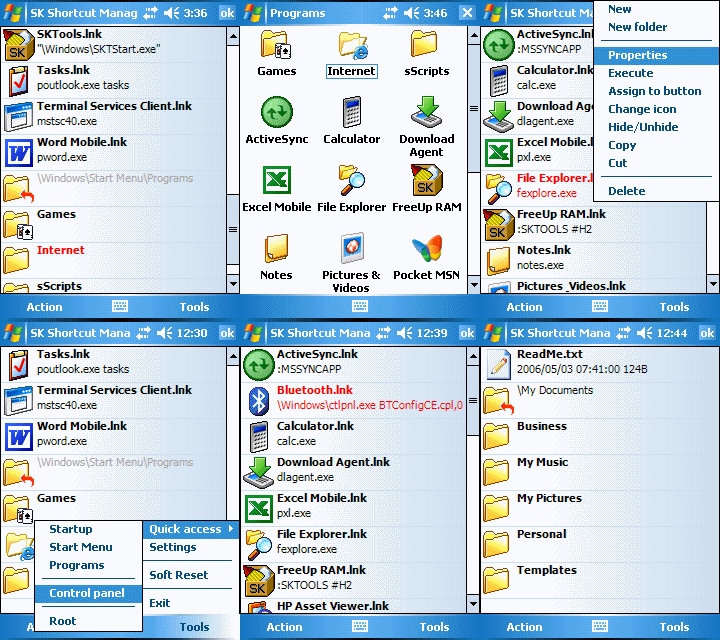
SK Shortcut Manager 1.1.3

License: Free
Price: Free

Description
The program is designed for a quick and handy management of shortcuts (those in the Start Menu as well as in any other place).
You can create, edit, delete, copy and move shortcuts. Apart from regular operations, you can associate any icons with shortcuts as well as with folders.
You can also associate a shortcut with a hardware button.

Features:
show shortcuts in selected folder
create shortcuts
create shortcuts for settings (control panel) applets
edit shortcuts
change icon for shortcuts
copy, move, rename, delete shortcut(s)
assign shortcut to hardware button
hide/unhide shortcuts
create, rename, delete folder(s)
change icon for folder
change icons for file types
QVGA, VGA support
WM2003(SE), WM5 support
English, German, Russian, Italian, French and Spanish UI language support

S2U2 2.10

License: Free
Price: Free

Description

S2U2 is the new version of Slide 2 Unlock. S2U2 is a lock/unlock application which has the iPhone style slide unlocking. It can be used as a screensaver while you don't use your device.
S2U2 (Slide 2 Unlock 2) is a simple lock/unlock application which has the iPhone style slide unlocking. It can be used as a screensaver while you don't use your device. And it's has CallerID function (but it may not work on some devices, so please try it first); S2P control plugin; and volume control.

Requirement

Windows Mobile Pocket PC 5 , 6 , 6.1

Wednesday, December 16, 2009

JETCET PRINT 5.2.10

License: Free
Price: Free

Description

JETCET PRINT gives users the ability to print documents, e-mail, and contacts to select Canon, Epson, Hewlett-Packard and PlanOn printers.

Features
· Print documents, pictures, email, email attachments, appointments, contacts, tasks, and web pages
· Find Files - Easily navigate to your files and email using JETCET's tabbed user interface (the "JETCET Explorer").
· Take Pictures - JETCET PRINT's direct capture feature launches your device's onboard camera.
· Edit Pictures - crop and apply preset filters, custom filters, and effects.
· Add Places - create shortcuts to frequently used folders on your device or network.
· Apply File Filters - use file filters to limit the number of files that appear in drop-down lists.
· Read ZIP Archives - tap on a .ZIP file to reveal its contents and print supported file types within.
· Select Multiple Page Layouts for documents and images.
· Print to Letter, Legal, A4, and B5 paper sizes.
· Supported File Types: .doc, .rtf, .txt, .pdf, .ppt, .pps, .xls, .htm, .html, .bmp, .png, .gif, .jpg, .jpeg, .jfif, .jpe

Requirement
· Windows Mobile 5 or higher
· ActiveSync 4.5 or Windows Mobile Device Center 6.1 for Windows Vista