if you feel bore and want to relax
Enjoy www.afcgame.com

Tuesday, July 20, 2010

JZ SmartMort v1.69

JZ SmartMort v1.69 | Read more...
Price: Free

Description
JZ SmartMort is a simple productivity tool for any Windows Mobile user. The software is my attempt to bridge the gap of missing features like:
* Copy / Paste
* Clipboard / URL history
* Multi-browser support (Opera Mini, Opera Mobile, NetFront, Skyfire, Iris, UCWEB, BOLT, jB5, Opera Mini for Windows Mobile, uZard & Internet Explorer)
* Make any installed browser system-level, where it opens links from anywhere. Ability to have a default browser (with a special timeout in case you want to open a link with a non-default browser).
* Hardware buttons - supports Pocket PCs and SmartPhones for advanced hardware button mapping.
* Opera Mini - shortcut on the Start Menu, different paste and URL handling methods to accommodate different phones.
* JBed - create Start Menu shortcuts for any JBed app, run JBed App directly using JZ SmartMort, troubleshoot your JBed installation and disable JBed security prompts.
* Ability to open synced Mobile Favorites with any browser, process killing and many other interesting features.
* Includes general tweaks and hacks which will keep growing.

UNINSTALLING / REMOVING:
If the CAB does not uninstall successfully, the best software to remove JZ SmartMort is SKTools. It did much better at uninstalling than PocketMechanic and MemMaid.

OPERA MINI PASTING ISSUES:
Make sure you have tried an alternative "Opera Mini Paste Method" in JZ Browser options.

Wuvuzela v2.10

Wuvuzela v2.10 | Read more...
Price: Free

Description
Wuvuzela is a little application that emulates the sound of the well known (and hated by many) Vuvuzela being used in the current Fifa 2010 World Cup at South Africa. This is a freeware application brought to you by JDB Pocketware. Free to use with full functionality, but will show an advertisement after closing the app. To get rid of the advertisement you can get the paid version.

Monday, July 19, 2010

Auto-Rotate Config v1.20

Auto-Rotate Config v1.20 | Read more...
Price: Free

Description
Auto-Rotate can configure the registry settings of built-in g-sensor auto-rotate service. This app is not resident, so, it consumes memory only when you are configuring rotation support.
This app was recommended by @WMRecommend.

User Guide
First, start the application that you like to auto-rotate.
Tap Start/Auto-Rotate.
Tap on Add. You will see a list of current running apps. Select your app from this list.
Tap OK.
Your application should rotate now.

Notes: Samsung's and HTC's auto-rotation service supports only one landscape angle. You don't need to add Opera, since it rotates itself.

Compatibility
Known to work on official GT-I8000 and GT-I8000L WM6.5 ROM. (IJ) Works on Samsung custom ROMs with original auto-rotate service. Works on HTC HD2, and other HTC Devices. Not all devices are supported.

Feedback
Please fell free to send bug and feature requests using this thread. If you have WM 6.1 and custom ROMs please let me know if it works.

MiCarrito Shopping List Manager v1.37

MiCarrito Shopping List Manager v1.37 | Read more...
Price: Free

Description
MiCarrito helps you manage your shopping list in an easy and intuitive way.
Sort your shopping list by product categories.
Create recipes defining their ingredients and add the ingredients in a recipe directly to the list.
Once in the supermarket, you can move the products from the list to the shopping cart/trolley as you put them into the cart.
As you fill your cart, you will be able to see how many products are in it and how much money your shopping costs.
For each product you can select the unit of measure and its price; and see the quantity that you’ve bought of that same product lately.

With MiCarrito you can:
- Manage your shopping list in an easy and intuitive way.
- Add all the ingredients in a recipe to the list in a couple of clicks.
- Once in the supermarket, you will know exactly how many items there are in your cart.
- Quickly synchronize, export and import your data.
- Finger-friendly and easy interface.

Localized in English, Spanish, Russian, Deutsch, Polish, Italian, Portuguese, Swedish, French, Hebrew, Danish, Korean and Chinese.

BookACab Singapore v1.00

BookACab Singapore v1.00 | Read more...
Price: Free

Description
bookACab allows you to easily book a cab in Singapore, via the CityCab & Comfort SMS booking system. Store your favorite location for quick booking. No need to wait for the operator to pick up your calls.

Alternatively, you can also make a booking via the traditional way of calling for the cabs. Quick dial any cab company without knowing their phone numbers


Requirements:
Windows Mobile Pocket PC 5 , 6 , 6.1, .Net 3.5

LeTour 2010 Mobile v1.10

LeTour 2010 Mobile v1.10 | Read more...
Price: Free

Description
LeTour 2010 gives you a complete overview of all stages of the Tour de France 2010 running from July 3th to July 25th. For all stages it shows the profile with heights and mountain categories. Now it includes the official rider and team lists and full stage profile information too.

Features:

- Map
- All stages in detail
- Mountain profiles for all stages
- Teams and riders
- Mulit-language

F1 2010 Mobile v3.10

F1 2010 Mobile v3.10 | Read more...
Price: Free

Description
F1 2010 Mobile has a small memory footprint runs on CF.NET 2.0 and includes:

-Calendar
-Circuit information

Results
-Drivers and Teams
-Pole position
-Update function

Additional information
-Driverslist
-Teamlist
-Championship
-Driver
-Team

Calendar
-Overview 2010
-Add GP events
-Remove GP events

In the following 15 languages:
  • -Bulgarian (Български)
  • -English
  • -Deutsch (German)
  • -Français (French)
  • -Español (Spanish)
  • -Hungarian (Magyar)
  • -Italiano (Italian)
  • -Nederlands (Dutch)
  • -Polski (Polish)
  • -Português-Portugal (Portuguese-Portuguese)
  • -Português-Brasileiro (Portuguese-Brazilian)
  • -Română (Romanian)
  • -Čeština (Czech)
  • -Pусский (Russian)
  • -Slovensko (Slovenian)

Race results can be filled in manually or by using the build-in update function. F1 2010 supports landscape and portrait format in all common display resolutions.

ND Stopshop v1.20

ND Stopshop v1.20 | Read more...
Price: Free

Description
First take a shutter reading in the camera using aperture mode without the filter. Take the shutter speed and select it in the application on the top left drop down menu and then select your filter on the right drop down menu.
Compose your photo before placing the filter on the lens. Anything over 30sec shutter setting on the camera which is the longest a camera will allow before you having to switch to bulb mode and the timer will automatically appear in the application with a go button.

Once the camera is set up with the filter on, press the shutter release button and timer go button(if present) on the app at the same time.

Not in all cases, the timer will appear. Only if you need to use the shutter over 30 seconds.

Don't forget to use a cable release button to prevent movement of the camera during the exposure and ensure a crisp sharp photo.

To abort the timer simply press abort on the left and then confirm on the right (new addition since version 1.1 due to accidental cancelling of the timer)

To use the timer again after a shot, simply hit go again (new addition since version 1.1 due to crashing)
Good luck!!!

Sunday, July 18, 2010

NotepadWS v2.00

NotepadWS v2.00 | Read more...
Price: Free

Description
NotepadWS is a notepad-like application with TABS feature and some interesting tools such as the WEB SEARCH.

The Web Search (context menu) allows you to get google, wiki or dictionary contents about the word or text selected from NotepadWS, it could be a good way to perform your search quickly and easily!

FEATURES
* Edit up to four different text files in the same session.
* Switch from one tab to another with just one click.
* Ability to add or remove tool bars at any time.
* Configure each tab separately.
* Online search of selected word or text; google search, wiki search, dictionary.
ver 2.0
* Open file and Save file dialogs completely redesigned to be useful and finger-friendly
* Settings page added


Requirements:
- Windows Mobile Pocket PC 5 , 6 , 6.1, 6.5
- VGA or higher resolution screen
- .NET Compact Framework 3.5

19touch v1.01

19touch v1.01 | Read more...
Price: Free

Description
The goal is to remove all fields from the game board. Fields can be removed only in pair. Remove fields with the same numbers of if the numbers add up to 10. But only if they are "touching" each other either vertically or horizonally. An arbitrary number of dashes (cleared fields) may lie between them. Also keep in mind that the lines are continuous, meaning that they are automatically line-breaking. When there is no moves left, computer will add all left numbers on the board. If there are some problems just use hint :)

Requirements:
Windows Mobile Pocket PC 5 , 6 , 6.1, 6.5, .Net CF 2.0, may use your internet connection

rbBible v0.05

rbBible v0.05 | Read more...
Price: Free

Description
rbBible
is bible app for windows phones which uses the translations below, other translations to come in the future.

King James Version - KJV
New English Translation - NET
Elberfelder Übersetzung - GERELB
American Standard Version - ASV
Bible in Basic English - BBE
Tradução de João Ferreira... - JFA-RC
Swedish Bible - SWE
Dutch Statenvertaling - DUTSV
English Revised Version
Ceský Ekumenický Preklad
Ceská Bible Kralická
Bible Pro 21 Století

If you're having problems installing/running the app, you will be pleased to know that it is also available in the Windows Phone Marketplace, the installer in the marketplace installs the two sqlce cabs while the marketplace installs .NETCF.

Change Log 0.5

Book, Translation list and downloadble list now uses Microsoft gesture
Decided not to seperate OT/NT as the Microsoft gestures are faster and smoother
Book names now loaded from database
Verse view left/right gesture implemented, right to left = next while left to right = previous chapter
Chapter select includes verse input
Search now goes to the Chapter and corressponding verse
More translations added many thanks to Hundera

Fake FingerPrint LockScreen v1.50

Fake FingerPrint LockScreen v1.50 | Read more...
Price: Free

Description
This Program is, as the name says, a LockScreen based on the concept of faking a FingerPrint scanner unlock. In reality, it is based simply on how many 'scans' it makes of your finger. This was a program idea from here. I am going to provide active updates for the program, starting with small things such as improving customization, etc. and ranging all the way up to converting the whole project (which is currently in C# .net CF 3.5) into a C++ Project for best speed and 'useability'!

Features:
  • Functional Lockscreen that is run when executing the file.
  • TopBar Items:
    • New Item Alerts: Featuring Icons that tell you when you have new Emails, Missed Calls, Voicemails, and Texts
    • Battery Meter: A full battery meter that changes color based on battery charge.
    • Clock: A Basic clock that displays the time of day.
    • Signal Meter: A Mostly-Accurate signal meter that tells you how much phone signal you have
  • Functioning Fake Fingerprint reader.
  • Customization of some components of the program.
How to Install:
  1. Download the attached CAB file.
  2. Transfer the CAB to your phone and run it.
  3. Install to the PHONE (I have not tested it on SD Card)
  4. Complete the Installation.
  5. Done.
How to Use:
  • To Customize: In the start menu go to CycloneApps / FFP_LockScreen and run the Customization EXE.
    • Enter appropriate values into each field and click OK.
  • To Use:
    • Locking: Run the FFP_LockScreen EXE.
    • Unlocking: This program unlocks based on a counter. When you put your finger down on the scan-zone it will start moving a scanner down and up. It starts at the top. When it hits the bottom, the counter will be at ONE, when it goes and hits the top, it will be TWO, and so forth. When you release your finger, if the counter value matches the programmed value (Default is 6, but it can be customized), it will unlock, otherwise it will not.
Bugs:
  • There is an issue with UNINSTALLING. After uninstalling, use a file-browser to navigate to the Folder of the program, and delete it...That isn't so tough.
  • There may be scanner issues based on the nature of the counter, so before reporting a bug, try again to make sure you didnt hold too long/ too short.
Notes:
  • This is Public Release 1.5, so not all features are there yet.
  • I plan to add in some more customization.
  • Eventually make it a whole lot faster.
  • Due to how it is programmed, this may gobble up battery, so use at your own risk of losing charge.


Requirements:
Windows Mobile Professional 6 (or higher), All Screen Resolutions Supported, .NET CF 3.5 (or higher)

Wallpaper Changer v1.40

Wallpaper Changer v1.40 | Read more...
Price: Free

Description
This application is a scheduled wallpaper changer program to change the backgrounds of Today (with Start Menu and LockScreen), Sense and S2U2.

Changes in 1.4
- No maximum files number anymore (maximum folders number is still 100)
- A "Change NOW interface" added to select the needed UI to the change
- Now the settings app shows the next time of the schedule
- Random and continuously change setting added (you'll see randomizing popup window sometimes)
- Intervals minimum set low to 1 minute with 1 minute steps
- Besides the interval, now you can change the wallpapers at a specific time, like 8:00AM every day
- The "back to the previous wallpaper" function is added and accessible with the "-prev" parameter and will change all choosen UI's wallpapers back to the previous one (not 100% if you use more than 1 directory for wallpapers storing).
- Several minor and major bugfixes

Requirements:
Windows Mobile 5, 6, 6.5, 6.5.X
NETCF 3.5

PocketShopping v1.80

PocketShopping v1.80 | Read more...
Price: Free

Description
PocketShopping is a finger-friendly shopping list software which allows you to maintain a master list of products you buy on a regular basis.

Main features:

- Finger-friendly user interface with smart scrolling, gestures and animation effects, similar to iPhone applications.
- Group the products by shop and by category.
- Unlimited number of shops, categories and products.
- Arrange the categories for each shop, by their location as you walk through the aisles. The products are sorted alphabetically.
- Two operating modes: selecting products to buy and going shopping. First, you must select from the master list the products which you want to buy, also you can add new products, categories and shops. Then, when you go shopping, change to "Go Shopping" mode, and you only will see the products which you selected previously, and then while buying you can mark the products introduced in the shopping cart.
- Set the unit type of each product (units, boxes, packets, Kg, etc.), and set the default unit type of each category (when adding a new product in a category, automatically the default unit type of the category is assigned to the new product).
- Set the quantity to buy for each product and the price.
- Quick search of products by using the keyboard.

Thursday, July 15, 2010

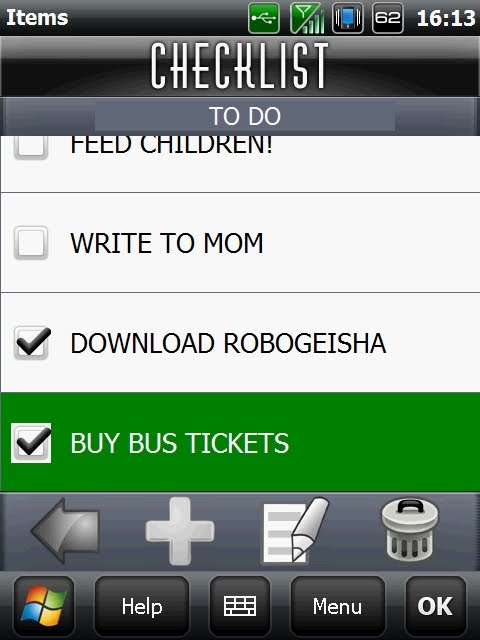
CheckList v1.10

CheckList v1.10 | Read more...
Price: Free

Description
A simple Check List application

* Organized by Categories
* New / Modify / Delete Category
* New / Modify / Delete Item
* Move Item to Vault / Restore Item from Vault
* Touch friendly
* Included Desktop Companion (PC application)
* No Master Lists!
* No Descriptions / Notes
* No Quantities
* No Item Pictures
* No Prices
* Without many functions and options


Requirements:
Windows Mobile Pocket PC 5 , 6 , 6.1,6.5, 6.5.x, VGA